
What Is LLMOps? A Beginner's Guide to Operating AI Applications in Production
Updated on October 19, 202612 minutes read
Building an LLM application is one problem. Keeping it reliable once real people use it is a different one. LLMOps is the set of practices that closes that gap.
This guide explains what LLMOps means, why AI apps need it, and what the day-to-day work looks like. No deep math is needed, just a basic idea of how apps call a large language model (LLM).
What happens after you build an LLM application?
Imagine you build a support chatbot for an online store. It reads the help center and answers customer questions. In your demo, it works well, and everyone is impressed.
Then you launch it. Within a week, strange things start to happen. A customer asks about a refund, and the bot quotes a policy that changed last month. Another user gets a long, rambling answer that costs ten times more than usual.
A teammate edits the prompt to fix one issue, and a different answer gets worse. Nobody can say which change caused it. You also can't tell whether the bot is getting better or worse overall.
None of these are "build" problems. They are operations problems. Your app works, but you can't yet see it, measure it, or change it safely. This is where LLMOps comes in.
What is LLMOps?
LLMOps (short for Large Language Model Operations) is the practice of running LLM-powered applications reliably in production. It covers how you deploy, monitor, evaluate, debug, and improve them over time.
The name borrows from DevOps and MLOps. DevOps brought discipline to shipping software. MLOps did the same for machine learning models. LLMOps adapts those ideas to apps built on top of language models.
LLMOps helps you answer questions like these:
- Is my app giving good answers today?
- If I change the prompt or the model, will results get better or worse?
- When a user reports a bad answer, can I find out why?
- How much is each request costing me, and how slow is it?
Most teams today don't train their own LLMs. They call a hosted model through an API and build around it. So LLMOps focuses less on training and more on everything wrapped around the model: prompts, data, retrieval, tests, and monitoring.
Why LLM applications need operational practices
LLM apps behave differently from normal code in a few important ways. Each one creates a risk that only shows up after launch.
Outputs are not fully predictable
The same question can produce slightly different answers each time. A response can sound confident and still be wrong, which is often called a hallucination. You can't rely on one manual check to prove the app works.
Small changes have big effects
Changing a single sentence in a prompt can shift tone, length, or accuracy across thousands of answers. Switching to a newer model version can do the same. Without tests, these shifts go unnoticed until users complain.
Quality is hard to define
A normal function either returns the right number or it doesn't. An LLM answer can be partly right, too long, off-brand, or missing a key detail. You need clear rules for what "good" means before you can measure it.
Cost and speed vary per request
Most hosted models charge by tokens, which are small chunks of text in the input and output. A long prompt or a chatty answer costs more and takes longer. These numbers need watching, just like server uptime.
LLMOps vs. traditional software development
LLMOps keeps many habits from regular software work, such as version control, testing, and monitoring. What changes is what you version, test, and monitor.
| Area | Traditional software | LLM applications |
|---|---|---|
| Core logic | Code written by developers | Code plus prompts, model choice, and retrieved data |
| Behavior | Same input gives the same output | Same input can give different outputs |
| Testing | Pass/fail unit tests | Scored evaluations on sample questions |
| Bugs | Errors, crashes, wrong values | Wrong facts, bad tone, off-topic or unsafe answers |
| What you version | Source code | Code, prompt templates, model versions, datasets |
| Monitoring | Uptime, errors, response time | All of those, plus token cost and answer quality |
The key shift is that quality becomes something you measure continuously. You can't just mark a feature "done" and move on.
The LLMOps lifecycle: build, deploy, monitor, evaluate, debug, improve
The LLMOps lifecycle is a loop, not a straight line. Every improvement you ship feeds new data back into the next round.
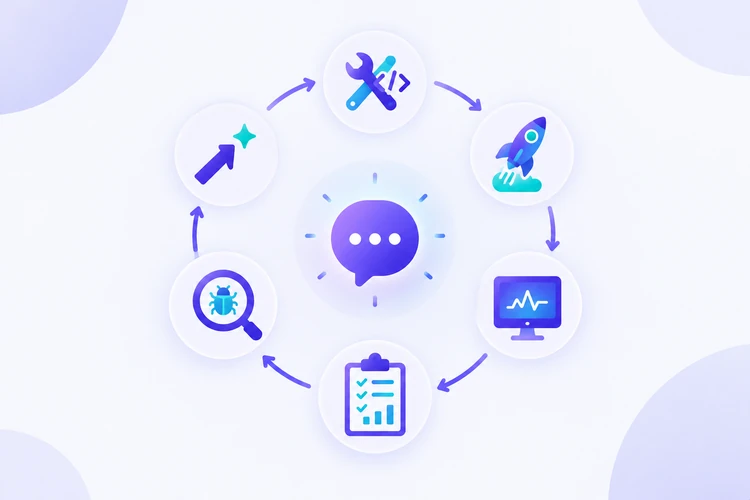
- Build. Create the app: write prompt templates, pick a model, connect data sources, and add a simple interface.
- Deploy. Release it to real users, ideally with prompts and settings stored separately from code so they are easy to change.
- Monitor. Track live signals such as error rates, response time, token usage, and user feedback (thumbs up or down).
- Evaluate. Score answers against a set of test questions to see whether quality is holding steady.
- Debug. When something fails, trace the exact request: what went in, what was retrieved, and what came out.
- Improve. Fix the prompt, the data, or the retrieval step. Then test again before the change goes live.
After step six, the improved version is deployed and the loop starts again. Teams that run this loop well can change their apps often without fear of breaking them.
Prompt management and experimentation
In an LLM app, the prompt works a lot like source code. It deserves the same care: version history, review, and testing.
What is a prompt template?
A prompt template is a reusable prompt with blanks that get filled in at runtime. Here is a simple example:
You are a friendly support assistant for {store_name}.
Answer using only the help articles below.
If the answer is not in the articles, say you don't know.

Articles: {retrieved_articles}
Question: {user_question}
Templates keep instructions consistent across thousands of requests. They also make changes easier to track, because you edit one template instead of scattered strings in your code.
Good prompt management habits
- Store prompts in version control or a prompt registry, not hard-coded deep in the app.
- Give each version a label, such as
support-v3, and note what changed. - Log which prompt version produced each answer.
- Never ship a prompt change without running it against your test questions first.
Experimenting safely
Experimentation means comparing two or more options side by side. For example, you might test prompt A against prompt B, or a large model against a cheaper, faster one.
Run both on the same set of inputs and compare scores, cost, and speed. Some teams also route a small share of live traffic to the new version before a full rollout.
Evaluation
Evaluation is how you measure whether your LLM app gives good answers. It replaces the gut feeling of "looks fine to me" with numbers you can track over time.
Start with an evaluation dataset
An evaluation dataset is a list of realistic test inputs, often with expected answers or notes. For the support bot, it might hold 50 real customer questions and the correct policy for each one.
Good datasets include easy questions, tricky edge cases, and questions the bot should refuse. Past user complaints are a good source of test cases.
Common ways to score answers
| Method | How it works | Good for |
|---|---|---|
| Rule-based checks | Code checks format, length, or required words | JSON output, banned phrases, length limits |
| Reference comparison | Compare the answer to a known correct answer | Facts with one right answer |
| LLM-as-a-judge | A second model grades the answer using a rubric | Tone, helpfulness, relevance |
| Human review | People rate a sample of answers | Final checks and building trust in other methods |
LLM-as-a-judge is popular because it scales, but it can be biased or inconsistent. It's wise to check its grades against human ratings now and then.
Offline vs. online evaluation
Offline evaluation runs before release, on your test dataset. Online evaluation happens after release, using live signals like user ratings or sampled reviews. Most mature teams use both.
Observability
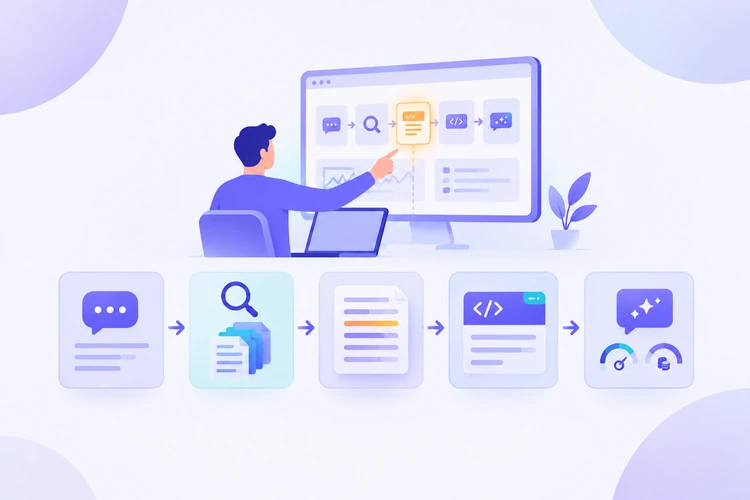
Observability means being able to see what your app did inside each request, not just whether it finished. Monitoring tells you that something is wrong. Observability helps you find out why.
Traces: the core building block
A trace is a step-by-step record of one request. For a support bot, a single trace might show:
- The user's question
- The search query sent to the help center
- The articles that came back
- The full prompt sent to the model, with its version label
- The model's answer, token count, cost, and response time
With this record, debugging becomes much faster. If the bot quoted an old refund policy, you can open the trace and see whether retrieval pulled the wrong article or the model ignored the right one.
What to track
- Speed: how long each step and the full request take
- Cost: tokens used and estimated spend per request and per day
- Errors: timeouts, API failures, and broken output formats
- Quality signals: user feedback, evaluation scores, and flagged answers
Several open-source and commercial tools focus on LLM tracing, such as Langfuse. Features differ between tools and change often, so compare current docs before you choose one.
RAG and its operational implications
Retrieval-Augmented Generation (RAG) is a pattern where the app first searches your own documents, then gives the best matches to the model as context. It lets an LLM answer questions about data it was never trained on, like your company's help center.
A basic RAG pipeline has a few steps. Documents are split into small pieces called chunks. Each chunk is turned into a list of numbers called an embedding and stored in a searchable index. At question time, the app finds the closest chunks and adds them to the prompt.
Why RAG adds operational work
RAG improves accuracy, but it also adds new places where things can break:
- Stale data: if the index isn't updated, the bot answers from old documents. This is the refund policy problem from our example.
- Poor retrieval: the right document exists, but the search returns the wrong chunks.
- Chunking choices: chunks that are too small lose context, while chunks that are too large waste tokens.
- Grounding failures: the model gets the right context but still adds facts that aren't in it.
Because of this, RAG apps need two kinds of evaluation. You test retrieval (did we find the right chunks?) and generation (did the answer stay faithful to them?). Traces make it easy to tell which half failed.
Common LLMOps challenges
Even with good habits, teams run into the same problems again and again. Knowing them early helps you plan for them.
| Challenge | What it looks like | A practical response |
|---|---|---|
| Silent quality drops | Answers get worse after a model or prompt update | Run evaluations before every release |
| Rising costs | Token spend climbs as traffic and prompts grow | Track cost per request; trim prompts; try smaller models |
| Slow responses | Users wait several seconds for an answer | Measure each step; cache common answers; stream output |
| Hard-to-reproduce bugs | A bad answer can't be repeated on demand | Log full traces with prompt and model versions |
| Unsafe or off-topic output | The bot shares private data or goes off script | Add input and output checks; test refusal cases |
| Vendor changes | A hosted model is updated or retired | Pin model versions where possible; re-test before switching |
Almost every fix in this table depends on having traces, test data, and versioned prompts in place before the problem appears.
Examples of LLMOps workflows
Here is how the lifecycle plays out in three everyday situations.
Workflow 1: Shipping a prompt change
- A developer drafts
support-v4to make answers shorter. - They run it against the 50-question evaluation set.
- Scores show answers are shorter, but two refund questions now miss key details.
- They adjust the prompt, re-run the tests, and all checks pass.
- The new version goes live, and its label appears in every trace.
Workflow 2: Fixing a user-reported bug
- A customer flags an answer that quotes the old refund window.
- The team opens the trace for that request.
- It shows retrieval returned an outdated help article.
- They re-index the help center and add this question to the evaluation set.
- The same mistake is now caught automatically in future tests.
Workflow 3: Controlling cost
- The dashboard shows daily token spend doubled in a week.
- Traces reveal that retrieval now adds ten long chunks to each prompt.
- The team tests sending five shorter chunks instead.
- Evaluation scores stay the same, and cost drops back to normal.
In each case, the fix was quick because the team already had traces and tests in place. That is the payoff of setting up evaluation and observability early.
Who should learn LLMOps?
LLMOps is useful for anyone who builds, ships, or owns an AI feature. You don't need a machine learning research background to get started.
- Software developers adding LLM features to existing products
- Data scientists and ML engineers moving from model training to LLM-based apps
- DevOps and platform engineers who will run these apps in production
- Product managers and QA testers who need to define and check AI quality
- Students and career changers who already know some Python and want practical AI skills
A basic grasp of Python, APIs, and how prompts work is a helpful starting point. The rest can be learned step by step.
A guided learning path
If you want to go beyond the fundamentals with hands-on practice, one structured option is Code Labs Academy's Fundamentals of LLMOps self-paced course. It's aimed at beginners and follows the same lifecycle covered in this guide.
According to the course page, learners build an app with prompt templating and a Streamlit interface, add a basic RAG pipeline with LangChain, and then evaluate, debug, and observe it using Langfuse. The course ends with a capstone project.
Conclusion and next steps
LLMOps is what turns a promising AI demo into a product people can trust. It gives you a repeatable way to build, deploy, monitor, evaluate, debug, and improve an LLM application.
You don't need a large team or complex tooling to begin. A few small habits are enough to start:
- Move your prompts into versioned templates
- Write 20 to 50 realistic test questions
- Log a full trace for every request
- Track token cost and response time from day one
- Re-run your tests before every prompt or model change
Start with one app and one loop. Each cycle will teach you more about how your system really behaves, and that knowledge is what LLMOps is built on.
Learn technical skills online with Code Labs Academy
Join our supportive community, unlock your potential, and embark on a rewarding career path.
Apply Now