SQL Window Functions: Real Interview-Style Examples (Beginner → Intermediate)
Updated on February 23, 202611 minutes read
SQL interviews often sound simple until you hear the follow-up: “Now do it per customer,” “per month,” or “compare each row to the previous one.” That’s the moment when basic GROUP BY stops being enough.
Window functions are the skill that turns those questions into a repeatable approach. They help you compute ranks, running totals, and comparisons without losing row-level detail.
This guide is for career changers, upskillers, and bootcamp learners who want SQL that matches real interview prompts. You’ll start with beginner patterns, then move into intermediate ones that show up in analytics and product roles.
What SQL window functions do
A window function calculates a value across a set of related rows while keeping each original row in the output. That’s different from aggregates, which usually collapse rows into fewer results.
Think of it like adding an analytics column beside your data. You don’t lose rows. You gain insight.
They’re perfect for questions like: “What’s the latest order per customer?” “What’s the running revenue?” “Who’s top 3 per month?” If that sounds like interview questions you’ve seen, you’re in the right place.
The one syntax pattern you need to learn
Most window questions use the same structure:
<window_function>(...) OVER (
  PARTITION BY ...
  ORDER BY ...
)
PARTITION BY defines the group you’re analyzing (like “per customer”).
ORDER BY defines the sequence inside that group (like “by order date”).
A helpful interview mental model is: “Partition is who/what, order is when/how.” Once you can say that clearly, your solutions get much easier to explain.
GROUP BY vs window functions (the interview trap)

GROUP BY is great for summaries, but it reduces the number of rows. That’s a problem when the question still needs each row (each order, each event, each user action).
Window functions keep all rows and add calculations alongside. That’s why they’re so common in reporting, dashboards, and take-home tasks.
A quick check helps in interviews. If the output needs every order or event row, start thinking “window function.”
A mini dataset you can picture in any business
Imagine an orders table from an online store or subscription platform. The values are simple, but the patterns match real interview datasets.
-- orders
order_id | customer_id | order_date  | category     | amount
---------+-------------+-------------+--------------+--------
101      | C001        | 2025-01-03  | Electronics  | 120.00
102      | C002        | 2025-01-04  | Books        | 25.00
103      | C001        | 2025-01-10  | Books        | 15.00
104      | C003        | 2025-01-12  | Electronics  | 220.00
105      | C002        | 2025-01-15  | Electronics  | 80.00
106      | C001        | 2025-02-02  | Electronics  | 60.00
107      | C003        | 2025-02-05  | Books        | 30.00
108      | C002        | 2025-02-11  | Books        | 12.00
109      | C003        | 2025-02-18  | Electronics  | 90.00
110      | C001        | 2025-02-21  | Books        | 18.00
This “customer + date + amount” structure appears everywhere. That’s why mastering window functions here transfers to most interview questions.
Beginner interview examples (the patterns you’ll reuse constantly)
1) Running total of revenue over time
Interview prompt: “Show each order and the running total revenue by date.”
Running totals are a classic window function use case. You keep each order and add a cumulative sum column.
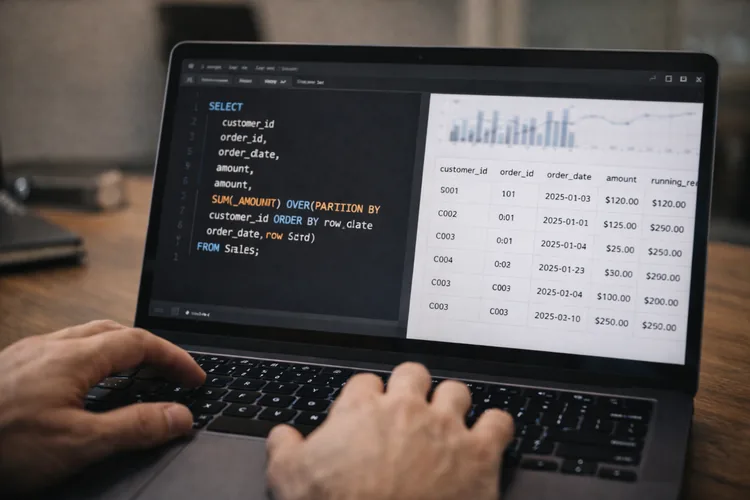
A useful way to think about it is:
RunningTotal
SELECT
  order_id,
  order_date,
  amount,
  SUM(amount) OVER (ORDER BY order_date, order_id) AS running_revenue
FROM orders
ORDER BY order_date, order_id;
The ORDER BY inside OVER() is what turns a normal sum into a running sum. Adding order_id as a tie-breaker prevents unstable ordering when dates match.
Follow-up: “Now do it per customer.”
That’s just adding PARTITION BY customer_id.
SELECT
  customer_id,
  order_id,
  order_date,
  amount,
  SUM(amount) OVER (
    PARTITION BY customer_id
    ORDER BY order_date, order_id
  ) AS customer_running_spend
FROM orders
ORDER BY customer_id, order_date, order_id;
2) Label each customer’s orders (ROW_NUMBER)
Interview prompt: “For each customer, label their orders 1st, 2nd, 3rd by time.”
This example makes partition + ordering feel intuitive. It also sets you up for “latest per customer” problems.
SELECT
  customer_id,
  order_id,
  order_date,
  amount,
  ROW_NUMBER() OVER (
    PARTITION BY customer_id
    ORDER BY order_date, order_id
  ) AS order_number_for_customer
FROM orders
ORDER BY customer_id, order_date, order_id;
ROW_NUMBER() always produces a unique sequence per partition. That’s why it’s perfect when you need to pick exactly one row later.
3) Latest row per customer (a top interview favorite)
Interview prompt: “Return the most recent order for each customer.”
This pattern shows up constantly: latest order, latest plan, latest login, latest address. The clean solution is ROW_NUMBER() plus a filter in an outer query.
WITH ranked AS (
  SELECT
    *,
    ROW_NUMBER() OVER (
      PARTITION BY customer_id
      ORDER BY order_date DESC, order_id DESC
    ) AS rn
  FROM orders
)
SELECT
  order_id,
  customer_id,
  order_date,
  category,
  amount
FROM ranked
WHERE rn = 1
ORDER BY customer_id;
In interviews, always add a tie-breaker like order_id. It proves you understand determinism, not just syntax.
4) Overall totals vs partition totals (quick confidence builder)
Interview prompt: “Show each order with the customer’s lifetime spend.”
This is a common “don’t lose row detail” moment. You want each order row, plus a customer-level total alongside it.
SELECT
  customer_id,
  order_id,
  order_date,
  amount,
  SUM(amount) OVER (PARTITION BY customer_id) AS customer_lifetime_spend
FROM orders
ORDER BY customer_id, order_date, order_id;
A helpful mental rule is: OVER() controls the scope.
OVER () is global, and OVER (PARTITION BY ...) is per group.
5) Percent of total (category share)
Interview prompt: “For each category, show total revenue and its percent of all revenue.”
This is a real dashboard-style output. It tests whether you can compute a “share of total” cleanly.
A simple formula view is:
WITH totals AS (
  SELECT
    category,
    SUM(amount) AS category_revenue
  FROM orders
  GROUP BY category
)
SELECT
  category,
  category_revenue,
  ROUND(100.0 * category_revenue / SUM(category_revenue) OVER (), 2) AS pct_of_total
FROM totals
ORDER BY category_revenue DESC;
The key detail is the denominator: SUM(category_revenue) OVER (). That gives the overall total without a second join.
Intermediate interview examples (where candidates usually get stuck)
6) Top N per group (top 2 customers per month by spend)
Interview prompt: “Find the top 2 customers by spend in each month.”
This is a classic because it requires two phases. First, you aggregate per month and customer, then you rank within each month.
WITH monthly_customer AS (
  SELECT
    DATE_TRUNC('month', order_date) AS month,
    customer_id,
    SUM(amount) AS month_spend
  FROM orders
  GROUP BY 1, 2
),
ranked AS (
  SELECT
    *,
    ROW_NUMBER() OVER (
      PARTITION BY month
      ORDER BY month_spend DESC
    ) AS rn
  FROM monthly_customer
)
SELECT
  month,
  customer_id,
  month_spend
FROM ranked
WHERE rn <= 2
ORDER BY month, rn;
Use ROW_NUMBER() when the question demands exactly N rows per group. If the interviewer wants ties included, switch to RANK() and explain the difference.
7) RANK vs DENSE_RANK (and how to talk about ties)
Interview prompt: “Create a leaderboard of customers by total spend.”
Many interviews add: “What if two customers have the same spend?” That’s where RANK() and DENSE_RANK() behave differently.
WITH customer_totals AS (
  SELECT
    customer_id,
    SUM(amount) AS total_spend
  FROM orders
  GROUP BY customer_id
)
SELECT
  customer_id,
  total_spend,
  RANK() OVER (ORDER BY total_spend DESC) AS spend_rank,
  DENSE_RANK() OVER (ORDER BY total_spend DESC) AS spend_dense_rank
FROM customer_totals
ORDER BY total_spend DESC;
RANK() leaves gaps after ties (1, 2, 2, 4).
DENSE_RANK() keeps ranks consecutive (1, 2, 2, 3).
A strong interview move is saying which you chose and why. That shows you can match SQL logic to business rules.
8) LAG: compare a row to the previous row
Interview prompt: “For each customer, show the difference from their previous order amount.”
This tests whether you can do row-to-row logic without self-joins. It also checks whether your ordering is stable and meaningful.
The idea can be expressed as:
WITH x AS (
  SELECT
    *,
    LAG(amount) OVER (
      PARTITION BY customer_id
      ORDER BY order_date, order_id
    ) AS prev_amount
  FROM orders
)
SELECT
  customer_id,
  order_id,
  order_date,
  amount,
  prev_amount,
  amount - prev_amount AS diff_from_prev
FROM x
ORDER BY customer_id, order_date, order_id;
The first row per customer has no previous row, so prev_amount is NULL. In interviews, mention that edge case and optionally handle it with COALESCE().
9) LEAD: look at the next row (time until next purchase)
Interview prompt: “For each order, show the next order date for that customer.”
This is common in retention and engagement analysis. It can lead to “days until next purchase” follow-ups.
WITH x AS (
  SELECT
    *,
    LEAD(order_date) OVER (
      PARTITION BY customer_id
      ORDER BY order_date, order_id
    ) AS next_order_date
  FROM orders
)
SELECT
  customer_id,
  order_id,
  order_date,
  next_order_date
FROM x
ORDER BY customer_id, order_date, order_id;
If your SQL dialect supports date differences, you can compute gaps. That’s often used to define repeat purchase behavior or churn thresholds.
10) Rolling average with a window frame (last 3 orders)
Interview prompt: “Compute a rolling average of the last 3 orders per customer.”
This is where frames matter. Frames turn “cumulative” into “rolling.”
A simple rolling-average view is:
SELECT
  customer_id,
  order_id,
  order_date,
  amount,
  AVG(amount) OVER (
    PARTITION BY customer_id
    ORDER BY order_date, order_id
    ROWS BETWEEN 2 PRECEDING AND CURRENT ROW
  ) AS rolling_avg_last_3_orders
FROM orders
ORDER BY customer_id, order_date, order_id;
If there are fewer than 3 prior orders, SQL averages over the available rows. That’s usually what you want, and it’s fine to say that in an interview.
11) First purchase date for every order (cohort-style thinking)
Interview prompt: “For each order, show the customer’s first purchase date.”
This appears in lifecycle reporting and cohort analysis. It’s a clean example of a partition-wide metric.
WITH x AS (
  SELECT
    *,
    MIN(order_date) OVER (PARTITION BY customer_id) AS first_order_date
  FROM orders
)
SELECT
  customer_id,
  order_id,
  order_date,
  first_order_date
FROM x
ORDER BY customer_id, order_date, order_id;
Even without calculating “days since first,” this is already useful. It helps segment first-time vs returning customer behavior.
12) NTILE: segment customers into quartiles by spend
Interview prompt: “Group customers into spend tiers (top 25%, next 25%, etc.).”
This is common in marketing analytics and user segmentation. You can build tiers quickly using NTILE().
WITH customer_totals AS (
  SELECT
    customer_id,
    SUM(amount) AS total_spend
  FROM orders
  GROUP BY customer_id
)
SELECT
  customer_id,
  total_spend,
  NTILE(4) OVER (ORDER BY total_spend DESC) AS spend_quartile
FROM customer_totals
ORDER BY total_spend DESC;
NTILE(4) creates four buckets based on ordering. It’s an interview-friendly way to show segmentation without extra logic.
Filtering window results correctly (CTEs save interviews)
A common mistake is trying to filter ROW_NUMBER() in the same query block. Most engines compute window functions after WHERE, so it won’t work as expected.
The portable fix is always: compute windows in a CTE, then filter outside. That’s why you’ll see WITH ranked AS (...) SELECT ... WHERE rn = 1 so often.
Some databases support QUALIFY (like BigQuery and Snowflake). But in interviews, the CTE method is widely accepted and easy to explain.
Dialect notes (so your logic stays portable)
Window function logic is consistent across databases. The main differences are usually date functions and minor syntax details.
For example, DATE_TRUNC('month', order_date) is common in PostgreSQL. In MySQL, you might use a different expression to bucket by month.
If your interviewer specifies a database, adjust the date formatting. But keep the window structure the same: partition + order + (optional) frame.
Performance and correctness tips interviewers respect
Always define ordering clearly when the question involves “previous” or “latest.” A stable ORDER BY avoids random-looking results in real datasets.
Avoid repeating the same window definition multiple times in one query. Compute once in a CTE and reuse the derived column.
When mixing aggregation and window functions, separate the phases. Aggregate first if needed, then rank or compare using windows in the next step.
Bonus: run window-function queries from Python (optional)
If you’re learning SQL for real workflows, it helps to know how it fits into a data stack. A simple pattern is running SQL from Python with pandas and SQLAlchemy.
import pandas as pd
from sqlalchemy import create_engine

engine = create_engine("postgresql+psycopg2://user:password@host:5432/dbname")

query = """
SELECT
  customer_id,
  order_id,
  order_date,
  amount,
  SUM(amount) OVER (
    PARTITION BY customer_id
    ORDER BY order_date, order_id
  ) AS customer_running_spend
FROM orders
ORDER BY customer_id, order_date, order_id;
"""

df = pd.read_sql(query, engine)
print(df.head())
This is a practical way to test interview-style queries and build portfolio notebooks. It also mirrors how analysts often work in real jobs.
Where Code Labs Academy fits (and how to build interview-ready SQL)
Once you learn window functions, your progress depends on practice with realistic prompts. That’s how you build speed, confidence, and accuracy under interview pressure.
In Code Labs Academy bootcamps, you practice job-ready skills through hands-on projects that become portfolio assets. You also get career support like mentoring and interview prep, which helps you communicate your thinking clearly.
If you’re planning a career change into data or analytics, a structured roadmap can help. Explore the bootcamps, talk to an advisor, or download a syllabus to plan your next steps.
Quick practice checklist (use this before interviews)
Practice “latest per group” until it feels automatic.
It’s one of the most repeated SQL interview patterns.
Practice “top N per group” with months, categories, or regions. It forces you to combine aggregation with ranking.
Practice one rolling metric with a frame clause.
It’s a common differentiator at the intermediate level.
Practice one row-to-row comparison with LAG() or LEAD(). It shows you can think in sequences, not only totals.
Your window function toolkit (and your next step)

SQL window functions are one of the best skills you can add for interviews and real work.
They power reporting, product analytics, and many business metrics teams rely on.
If you master just a few patterns, you’ll handle most questions confidently. Running totals, top N per group, row comparisons, and rolling averages cover a huge share of interview prompts.
The next step is focused practice with real scenarios and time pressure. When you’re ready for a guided, career-focused roadmap, explore Code Labs Academy programs.
You can Apply to build job-ready skills, a portfolio, and the support that helps you land interviews.