
How to Secure an AWS Environment: IAM, Secrets, CI/CD, and Logging Explained
Updated on November 05, 202611 minutes read
Knowing cloud security principles is the starting point. This guide covers the next step: turning them into real settings, policies, and pipeline steps.
If you need a refresher on the concepts, our article on AWS cloud security fundamentals explains them. Here, we'll apply them to one realistic project from start to finish.
Introduction: From security principles to implementation
Throughout this guide, we'll secure a small example called the Invoices API. It's a web API that stores customer invoices as PDF files in Amazon S3 and keeps invoice records in an Amazon RDS database.
The team uses GitHub for code and GitHub Actions for deployments. They have two AWS accounts: one for development and one for production.
Each section below takes one security area and shows what the team actually configures. The examples use the AWS CLI and JSON policies. Names like invoices-prod are placeholders, so swap in your own.
Start with identity: designing IAM access
Good IAM design starts by listing who and what needs access. For the Invoices API, there are three kinds of identity:
| Identity | Who or what | How it gets access |
|---|---|---|
| People | Developers and one admin | IAM Identity Center with MFA |
| Application | The running Invoices API | An IAM role with temporary credentials |
| Pipeline | GitHub Actions deployments | An IAM role assumed through OIDC |
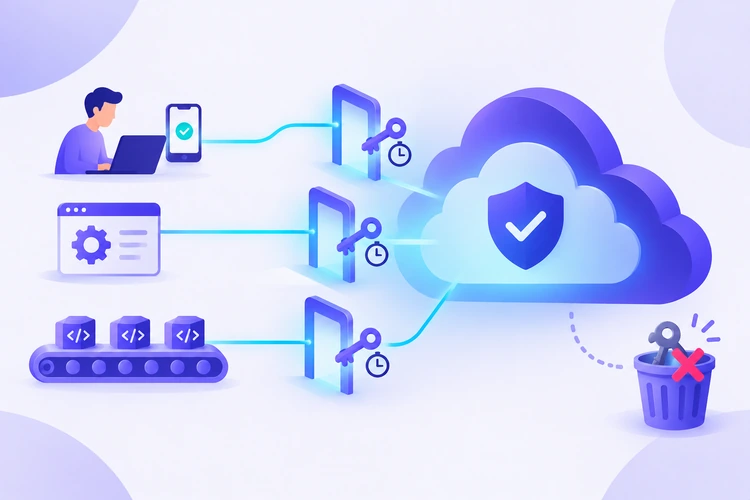
No identity uses long-term access keys. People sign in through IAM Identity Center, AWS's central sign-in service, and receive short-lived credentials. The app and pipeline use IAM roles, which also hand out temporary credentials.
Separate permissions by account and job
The team creates permission sets in IAM Identity Center. A permission set is a bundle of permissions that you assign to a person in a specific account.
- Developers: broad access in the dev account, read-only access in production
- Admin: full access in both accounts, used only for account-level changes
- Root user: MFA enabled, credentials stored safely, and never used for daily work
This setup means a developer's mistake in dev can't change production. It also means a stolen developer session has limited reach.
Apply least privilege
The app role is where least privilege matters most. If an attacker exploits a bug in the API, they inherit the role's permissions.
The Invoices API only needs to read and write PDFs under one folder in one bucket, and read one secret. Here is the policy:
{
  "Version": "2012-10-17",
  "Statement": [
    {
      "Sid": "InvoiceFiles",
      "Effect": "Allow",
      "Action": ["s3:GetObject", "s3:PutObject"],
      "Resource": "arn:aws:s3:::invoices-prod/pdfs/*"
    },
    {
      "Sid": "DatabaseSecret",
      "Effect": "Allow",
      "Action": "secretsmanager:GetSecretValue",
      "Resource": "arn:aws:secretsmanager:eu-central-1:111122223333:secret:prod/invoices/db-*"
    }
  ]
}
There is no s3:DeleteObject, no access to other buckets, and no IAM permissions. If the app later needs to delete files, the team adds that one action after a review.
Practical ways to get there
Writing the perfect policy on day one is hard. Teams usually tighten permissions in steps:
- Start from what the code calls. List the AWS API actions your app uses, and allow only those.
- Scope resources. Replace
*with specific ARNs (Amazon Resource Names, the unique ID of each AWS resource). - Use activity data. IAM Access Analyzer can generate a policy based on actions a role actually used, as recorded in CloudTrail.
- Set guardrails. A permissions boundary caps the maximum permissions a role can ever have, even if someone attaches a broader policy later.
Protect secrets and credentials
The Invoices API needs a database password. In the team's first prototype, it sat in a .env file. Now it moves to AWS Secrets Manager.
Creating the secret:
aws secretsmanager create-secret \
  --name prod/invoices/db \
  --secret-string '{"username":"invoices_app","password":"REPLACE_ME"}'
The app reads it at startup using its IAM role. No password appears in the code, the container image, or the repository:
aws secretsmanager get-secret-value --secret-id prod/invoices/db
In application code, you'd make the same call through the AWS SDK for your language.
Rotation and cleanup
Secrets Manager can rotate some secrets on a schedule, including credentials for supported databases. Amazon RDS can also manage the master password in Secrets Manager for you. Check the current docs for which engines and options are supported.
The team also cleans up the old setup. They change the password that used to live in .env, because anything that was ever committed to Git should be treated as exposed.
Encrypt sensitive data
Invoices contain customer names and payment details, so the team encrypts them with a customer managed KMS key. This gives them control over who can use the key, and every use of the key is logged.
Encrypt the S3 bucket
They set the bucket's default encryption to use their KMS key:
aws s3api put-bucket-encryption \
  --bucket invoices-prod \
  --server-side-encryption-configuration '{
    "Rules": [{
      "ApplyServerSideEncryptionByDefault": {
        "SSEAlgorithm": "aws:kms",
        "KMSMasterKeyID": "alias/invoices-key"
      },
      "BucketKeyEnabled": true
    }]
  }'
BucketKeyEnabled reduces the number of calls to KMS, which can lower costs for busy buckets. The key policy allows only the app role and the admin role to use the key.
Encrypt the database and data in transit
For RDS, encryption is chosen when the database is created. An existing unencrypted database usually has to be migrated, for example by restoring an encrypted copy of a snapshot. That's another reason to decide early.
To protect data in transit, the team adds a bucket policy statement that denies any request not made over HTTPS:
{
  "Sid": "DenyInsecureTransport",
  "Effect": "Deny",
  "Principal": "*",
  "Action": "s3:*",
  "Resource": ["arn:aws:s3:::invoices-prod", "arn:aws:s3:::invoices-prod/*"],
  "Condition": { "Bool": { "aws:SecureTransport": "false" } }
}
Add security checks to CI/CD
The pipeline deploys to production, so it gets the same care as any other identity.
Remove long-lived keys with OIDC
Instead of storing AWS access keys in GitHub, the team sets up OpenID Connect (OIDC). GitHub proves the workflow's identity to AWS, and AWS returns short-lived credentials.
The main statement in the deploy role's trust policy only allows workflows from the main branch of one repository:
{
  "Effect": "Allow",
  "Principal": {
    "Federated": "arn:aws:iam::111122223333:oidc-provider/token.actions.githubusercontent.com"
  },
  "Action": "sts:AssumeRoleWithWebIdentity",
  "Condition": {
    "StringEquals": { "token.actions.githubusercontent.com:aud": "sts.amazonaws.com" },
    "StringLike": { "token.actions.githubusercontent.com:sub": "repo:example-org/invoices-api:ref:refs/heads/main" }
  }
}
A feature branch or a fork can't assume this role. The deploy role itself only has permission to update the Invoices API, not to change IAM.
Add scanning stages
The team adds checks that stop the pipeline when something risky shows up:
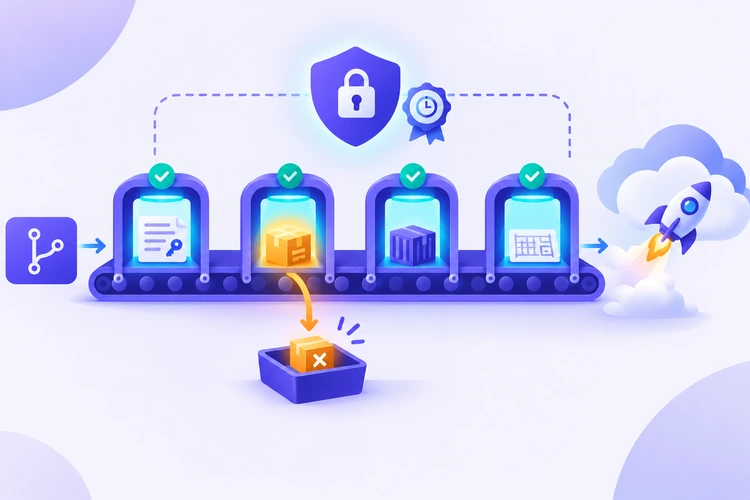
| Stage | Tool example | What it catches |
|---|---|---|
| Secret scan | Gitleaks | Passwords, tokens, and keys in commits |
| Dependency scan | Trivy (filesystem mode) | Known vulnerabilities in libraries |
| Image scan | Trivy (image mode) | Vulnerable packages in the container image |
| Infrastructure scan | Trivy (config mode) | Risky settings in Terraform or CloudFormation |
| Deploy | AWS CLI or IaC tool | Runs only if all checks pass |
A simplified scanning step might look like this:
gitleaks detect --source . --redact
trivy fs --severity HIGH,CRITICAL --exit-code 1 .
trivy config --exit-code 1 ./infra
Command names and flags can change between tool versions, so check each tool's docs. The idea stays the same: a failed check means no deployment.
Implement logging and auditing
With access locked down, the team makes sure they can see what happens. They create a CloudTrail trail that records API activity in all regions:
aws cloudtrail create-trail \
  --name invoices-audit-trail \
  --s3-bucket-name invoices-audit-logs \
  --is-multi-region-trail \
  --enable-log-file-validation

aws cloudtrail start-logging --name invoices-audit-trail
Log file validation helps detect whether log files were changed or deleted. The log bucket blocks public access, and only the admin role can delete from it. Some teams send logs to a separate, dedicated logging account for extra protection.
Alert on high-risk events
Logs alone don't help if nobody reads them. The team sets up a short list of alerts using Amazon EventBridge or CloudWatch:
| Event | Why it matters |
|---|---|
| Root user sign-in | Root should almost never be used |
| IAM policy or role changes | Could grant an attacker more access |
| CloudTrail stopped or deleted | A common step to hide activity |
| S3 bucket policy changes | Could make invoices public |
| KMS key scheduled for deletion | Could make encrypted data unreadable |
They also turn on Amazon GuardDuty, a threat detection service that analyzes logs for suspicious behavior, such as API calls from unusual locations.
Review security continuously
Security settings drift over time. New features add permissions, and temporary exceptions become permanent. The team schedules regular reviews:
| How often | What they review |
|---|---|
| Every deploy | Pipeline scan results |
| Weekly | GuardDuty findings and triggered alerts |
| Monthly | Unused roles, permissions, and access keys |
| Quarterly | Who has production access, and whether they still need it |
AWS Config helps by checking resources against rules continuously. For example, managed rules can flag security groups that allow SSH from anywhere or S3 buckets that allow public reads. AWS Security Hub can collect findings from several services into one view.
Example secure AWS workflow
Here is what a single feature change looks like once everything is in place:
- A developer signs in through IAM Identity Center with MFA and tests a change in the dev account.
- They open a pull request. The pipeline runs Gitleaks and Trivy. A test API key in the code fails the secret scan, so they move it to Secrets Manager.
- After review, the change merges to
main. - GitHub Actions assumes the deploy role through OIDC and deploys to production. No stored keys are involved.
- The new version runs with the app role. It reads its database secret at startup and writes encrypted PDFs to S3.
- CloudTrail records every step. No alerts fire, because nothing unusual happened.
- A week later, the monthly review shows a test role from an earlier experiment. The team deletes it.
This one change touches every area covered above: identity, least privilege, secrets, encryption, pipeline checks, logging, and review.
Common implementation mistakes
Even teams that know the principles slip up during implementation. Common gaps include:
| Mistake | What to do instead |
|---|---|
Using "Resource": "*" because scoping felt hard | Start with specific ARNs and widen only when needed |
OIDC trust policy without a sub condition | Restrict to one repository and branch |
| Moving secrets to Secrets Manager but not changing the old values | Rotate anything that was ever in code or Git history |
| Encrypting with KMS but allowing everyone to use the key | Limit key use in the key policy |
| Creating a trail but storing logs in an unprotected bucket | Restrict deletes; consider a separate log account |
| Scans that only warn instead of failing the build | Make high-severity findings block deployment |
| No owner for alerts | Assign alerts to a person or team who will respond |
Practical security checklist
Use this list to check your own AWS environment:
- Root user has MFA and is not used for daily tasks
- People sign in through IAM Identity Center with MFA
- Dev and production run in separate AWS accounts
- Apps and pipelines use IAM roles, not long-term access keys
- Policies name specific actions and resources
- Secrets live in Secrets Manager or Parameter Store, not in code
- Any secret that was ever committed has been rotated
- Sensitive data is encrypted with a KMS key that has a tight key policy
- Buckets with sensitive data deny non-HTTPS requests
- CI/CD uses OIDC with a trust policy limited to one repo and branch
- Secret and vulnerability scans block deployments on high-severity findings
- A multi-region CloudTrail trail is on, with log file validation
- Alerts exist for root sign-in, IAM changes, and trail changes
- Unused roles, keys, and permissions are reviewed monthly
A structured way to practice
Reading a checklist is a good start, but these skills build up through repetition. For readers who want a structured environment to practice, one option is Code Labs Academy's AWS Cloud Security Fundamentals self-paced course.
According to the course page, its modules cover IAM design and least privilege, secrets and key management, security scanning in CI/CD with Gitleaks and Trivy, and logging and auditing. It finishes with a capstone project to build a secure cloud environment. You can also practice with a personal AWS account and the official AWS documentation.
Conclusion and next steps
Securing an AWS environment takes a set of decisions that work together: who can access what, where secrets live, how data is encrypted, what the pipeline checks, and who watches the logs.
You don't have to build everything at once. A sensible order is identity first, then secrets, then pipeline checks, then logging and alerts. Each step reduces risk on its own.
Pick one item from the checklist that your environment is missing and fix it this week. Then come back for the next one. Over time, the secure option becomes the normal way your team works.

Learn technical skills online with Code Labs Academy
Join our supportive community, unlock your potential, and embark on a rewarding career path.
Apply Now