
How to Build an AI Agent: Tools, RAG, Workflows, and Practical Patterns
Updated on September 29, 20269 minutes read
Introduction: From the Agent Concept to a Working Application
Understanding the agent loop (goal, reasoning, action, observation) is one thing. Actually building an agent means making concrete decisions: which model to use, what tools to give it, how to structure its workflow, and how to catch failures before they reach a user.
This article walks through those decisions step by step. It assumes you already understand what an agent is and focuses instead on the practical architecture behind a working single-agent application.
Anatomy of a Basic AI Agent
A basic AI agent is built from a small set of components working together.
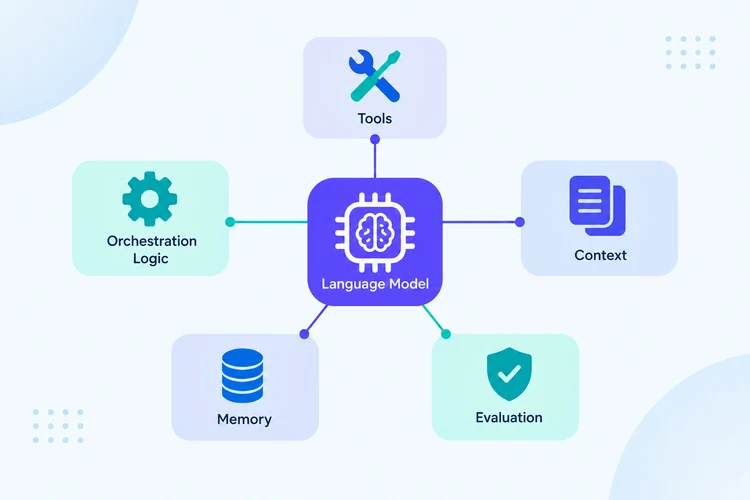
| Component | Role |
|---|---|
| Language model | Reasons about the goal and decides what to do next |
| Tools | External functions the agent can call (search, database, API) |
| Orchestration logic | Manages the loop of reasoning, acting, and observing |
| Context | The information available to the model at each step |
| Memory | What the agent retains across steps or sessions |
| Evaluation | Checks whether the agent's outputs and actions are correct |
These pieces can be assembled with a framework or built directly on top of an LLM API. Either way, the underlying architecture is the same: a model that decides, tools it can call, and a loop that connects them.
Step 1: Define the Goal
Every agent needs a clearly defined goal, along with the boundaries of what it's allowed to do to achieve it. A vague goal like "help with research" produces inconsistent behavior. A specific one, such as "answer questions using only the provided document set, and say so if the answer isn't found," gives the model something concrete to work toward.
Defining the goal also means defining constraints: what the agent should never do, what actions require confirmation, and what counts as success. These constraints belong in the system instructions, not left implicit.
Step 2: Choose the Model
Not every task needs the most capable model available. Model choice for an agent depends on a few practical factors: how complex the reasoning is, how reliably the model can follow tool-use instructions, response latency requirements, and cost per request, especially for agents that make multiple model calls per task.
A common practical approach is to prototype with a strong general-purpose model, then evaluate whether a smaller or faster model performs acceptably once the task and tools are well defined. Reasoning quality and tool-calling reliability matter more for agents than for simple chatbots, since a single bad decision can derail an entire multi-step task.
Step 3: Give the Agent Tools
A tool is a function the model can call, such as a web search, a database query, a calculator, or an internal API. Each tool needs a clear description: what it does, what inputs it expects, and what it returns.
Tool design has an outsized effect on agent reliability. A few practical guidelines help:
- Keep each tool focused on one clear function rather than bundling multiple actions together.
- Write tool descriptions the way you'd explain them to a new colleague, specific and unambiguous.
- Limit the number of tools available at once; too many similar options increase the chance the model picks the wrong one.
- Return structured, predictable output from each tool so the model can reliably use the result.
Step 4: Connect External Information
Many agent tasks depend on information the model doesn't have on its own: current data, internal documents, or account-specific details. This is typically handled through tool calls to APIs, databases, or search systems, rather than assuming the model already knows the answer.
The key design question at this step is what information the agent needs, and when. Some information is needed upfront as part of the initial context; other information is better fetched on demand through a tool call once the agent determines it's actually relevant to the current step.
Step 5: Add RAG Where Appropriate
Retrieval-Augmented Generation fits into an agent as one tool among others, not as the entire system. When a task depends on a knowledge base, such as documentation, policies, or past support tickets, the agent can call a retrieval tool to search that knowledge base and use the results as part of its reasoning.
This differs from a standalone RAG pipeline in one important way: the agent decides when retrieval is needed, rather than retrieval happening automatically on every request. A well-designed agent might retrieve documentation for one part of a task and skip retrieval entirely for another part that doesn't require it.
Step 6: Define the Agent Workflow
The workflow determines how the agent moves through its loop: how many steps it can take, when it should stop, and what triggers a new round of reasoning. A basic implementation might cap the number of tool calls per task, define clear stopping conditions, such as "stop once the goal is satisfied or after three failed attempts," and specify what happens if the agent can't complete the goal, rather than letting it loop indefinitely.
Workflow design is where a lot of practical reliability comes from. An agent without clear stopping conditions can loop unnecessarily, burn through cost and latency, or produce inconsistent results across runs.
Step 7: Handle Tool Results and Errors
Tool calls fail. APIs time out, searches return empty results, and inputs sometimes don't match what a tool expects. A production-ready agent needs explicit handling for these cases, not just a happy-path implementation.
Practical patterns include retrying a failed call with adjusted parameters, falling back to an alternative tool or a direct answer when a call fails repeatedly, and surfacing a clear message to the user rather than letting the agent guess when it has no usable information. Treating error handling as a core part of the design, not an afterthought, is one of the clearest differences between a demo agent and a reliable one.
Step 8: Evaluate the Agent
Evaluation for an agent needs to look at more than just the final answer. Two other things matter just as much: whether the agent chose the right tools at the right times, and whether it stopped or continued appropriately given the situation.
Practical evaluation approaches include testing the agent against a set of representative tasks with known correct outcomes, reviewing tool-call logs to catch unnecessary or incorrect calls, and tracking failure patterns over time rather than testing once and assuming the behavior will hold. Agent behavior can shift as prompts, tools, or underlying models change, so evaluation is an ongoing practice, not a one-time check.
Example Agent Workflow
A concrete example makes the architecture easier to follow. Consider a research assistant agent handling the request: "What are the latest changes to this topic, and how do they compare to last year?"
The flow looks like this: the user submits the goal, the agent reasons about what's needed and calls a search tool to find recent information, the search results come back as retrieved information, the agent reasons about whether it has enough to answer or needs more, it may make an additional tool call to look up last year's data for comparison, and once it has what it needs, it generates a final response that synthesizes both sets of findings.
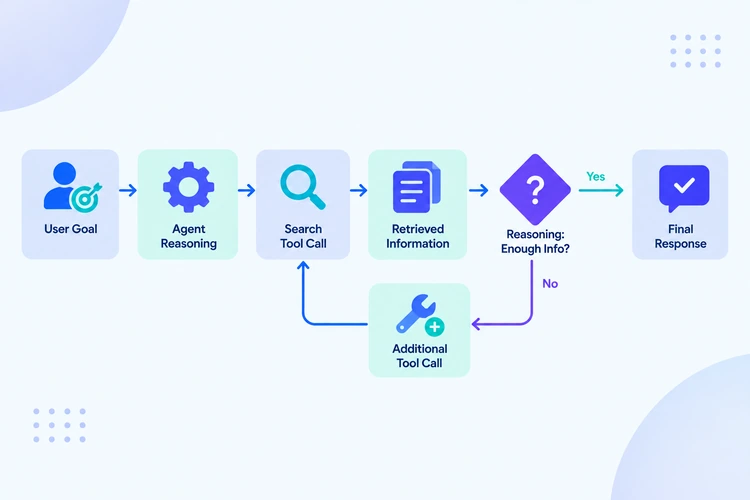
Each arrow in that flow represents a real decision point where the agent could take a different path depending on what it finds, which is exactly what distinguishes this from a fixed, scripted lookup.
Single-Agent vs. More Complex Workflows
Most practical applications are well served by a single, well-designed agent with the right tools. Before reaching for a multi-agent setup, it's worth checking whether the complexity is actually justified.
A single agent handling multiple sub-tasks sequentially is usually simpler to build, easier to debug, and more predictable than splitting the same task across several coordinating agents. Multi-agent architectures make sense when sub-tasks genuinely benefit from separate specialized reasoning or when different parts of a task need to run independently, but they introduce real coordination and failure-handling overhead that a single agent doesn't have.
Common Agent-Building Mistakes
A few mistakes come up repeatedly when building agents.
Giving the agent too many tools at once. This increases the chance of the wrong tool being selected and makes the agent's behavior harder to predict.
Vague or missing stopping conditions. Without clear boundaries, an agent can loop, repeat actions, or run longer than necessary.
No error handling. Assuming every tool call will succeed leads to agents that fail badly instead of failing gracefully.
Skipping evaluation. An agent that works in a demo can behave very differently once it encounters real, unpredictable user input.
Reaching for an agent when a simpler solution would do. Not every task needs multi-step reasoning; sometimes a single API call or a fixed script is the more reliable choice.
When Deterministic Workflows May Be Better Than Agents
Agentic design isn't always the right approach. A deterministic, scripted workflow is often preferable when the task is a fixed sequence with no real decision points, when the outcome must be fully predictable and auditable, such as in regulated processes, or when latency and cost need to stay minimal and predictable.
In many real systems, the right answer is a mix: a deterministic workflow for the parts of a task that don't need flexibility, with an agent handling the specific steps that genuinely require reasoning and adaptability.
Practical Checklist
Before considering an agent implementation complete, it's worth checking a few things:
- The goal and constraints are clearly defined, not implicit.
- Each tool has a focused purpose and a clear description.
- Stopping conditions are explicit, not left to chance.
- Tool failures are handled, not assumed away.
- The agent has been evaluated against realistic, varied tasks, not just a single happy-path example.
- A simpler, non-agentic approach was genuinely considered and ruled out, not skipped by default.
Conclusion
Building a working AI agent involves more than connecting a model to a few tools. It requires deliberate decisions about goals, tool design, workflow boundaries, error handling, and evaluation, each of which has a direct effect on whether the resulting system is reliable or just impressive in a demo.
Stronger agent-building skills tend to come from repeated practice: building different applications, working with different tools, integrating RAG where it's genuinely useful, and testing workflows against real, messy inputs rather than clean examples. If you're looking for a guided learning path into this area, one structured way to build these skills is through Code Labs Academy's self-paced course, Agentic AI: Intro to Agent Development, which is one option among several for developing this kind of practical experience.
Learn technical skills online with Code Labs Academy
Join our supportive community, unlock your potential, and embark on a rewarding career path.
Apply Now