
How to Build a RAG Application: From Search and Retrieval to LLM Generation
Updated on October 05, 20269 minutes read
Introduction: From the RAG Concept to a Working Application
Understanding what Retrieval-Augmented Generation is conceptually is one thing. Actually building a RAG application is another. Once you move past the idea of "retrieve relevant information, then generate an answer," you run into real engineering decisions: how to split documents, which embedding model to use, how to store and search vectors, and how to keep the LLM from ignoring the context you just handed it.
This article walks through the practical side of building a basic RAG pipeline, step by step. It assumes you already understand what RAG is and why it's useful. The focus here is different: what actually happens, in what order, and what tends to go wrong along the way.
Architecture of a Basic RAG Application
Before diving into individual steps, it helps to see the full picture. A basic RAG application typically involves the following components working together.
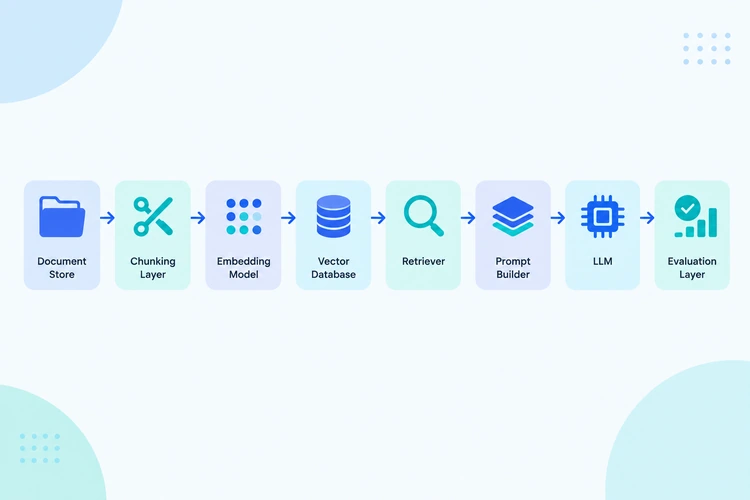
| Component | Role |
|---|---|
| Document store | Raw source files (PDFs, wikis, tickets, manuals) |
| Chunking layer | Splits documents into smaller, retrievable pieces |
| Embedding model | Converts text chunks into numerical vectors |
| Vector database | Stores and indexes those vectors for fast search |
| Retriever | Finds the most relevant chunks for a given query |
| Prompt builder | Assembles the retrieved context and the user's question into a prompt |
| LLM | Generates the final answer based on the prompt |
| Evaluation layer | Measures whether retrieval and generation are actually working well |
Each of these pieces can be simple or sophisticated depending on the use case. A basic implementation might run entirely with open-source libraries on a single machine. A production system might involve managed vector databases, caching layers, and monitoring dashboards. The underlying flow, however, stays the same across both.
Step 1: Prepare the Knowledge Source
Every RAG pipeline starts with source content. This could be a folder of PDFs, a set of Markdown files from internal documentation, exported support tickets, or scraped web pages.
Before anything else, this content needs to be cleaned and standardized. Practical preparation tasks include:
-
Removing boilerplate content such as headers, footers, and navigation text that adds noise without meaning.
-
Converting different file formats (PDF, DOCX, HTML) into a consistent plain text or structured format.
-
Preserving useful metadata, such as document title, source URL, last updated date, and section headings, since this metadata is often used later for filtering and citation.
Skipping this step is one of the most common reasons RAG systems underperform. If the source content is messy, retrieval will surface messy, low-quality chunks no matter how good the rest of the pipeline is.
Step 2: Chunk Documents
Documents are almost always too large to embed and retrieve as single units, so they need to be split into smaller pieces called chunks. Chunking is one of the most underestimated steps in building a RAG system, because chunk size and structure directly affect retrieval quality.
A few common chunking strategies include:
Fixed-size chunking. Splitting text into chunks of a set number of tokens or characters, often with some overlap between consecutive chunks to preserve context at the boundaries. This is simple to implement but can cut sentences or ideas in half.
Structure-aware chunking. Splitting along natural document boundaries, such as headings, paragraphs, or sections, so each chunk represents a coherent unit of meaning rather than an arbitrary slice of text.
Semantic chunking. Using the content itself to determine chunk boundaries, grouping sentences that are topically related and splitting where the topic shifts.
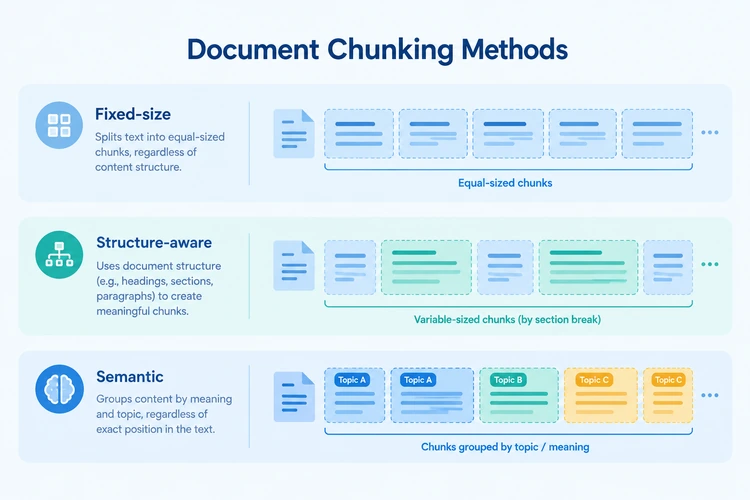
There's no universal "correct" chunk size. Very small chunks can lose important context, while very large chunks can dilute relevance and make it harder for the retriever to distinguish between topics. A reasonable starting point for many text-heavy documents is a few hundred tokens per chunk with modest overlap, adjusted based on testing against real queries.
Step 3: Create Embeddings
Once documents are chunked, each chunk is converted into a numerical vector using an embedding model. This vector represents the meaning of the text in a way that allows mathematical comparison: chunks with similar meaning end up positioned close together in vector space, even if they use different words.
Choosing an embedding model involves a few practical trade-offs:
-
Domain fit. General-purpose embedding models work well for broad content, but specialized domains (legal, medical, code) sometimes benefit from domain-tuned embedding models.
-
Vector dimensionality. Higher-dimensional embeddings can capture more nuance but require more storage and slightly more compute during search.
-
Cost and latency. Embedding generation happens both when indexing documents and, for the query, at request time, so model speed and cost matter for both stages.
The embedding step only needs to run once per chunk during indexing. Queries are embedded on the fly, using the same or a compatible embedding model, so the resulting vectors are comparable.
Step 4: Store and Search the Information
Once chunks are embedded, the resulting vectors need to be stored somewhere searchable. This is the role of a vector database, a system designed to store high-dimensional vectors and quickly find the closest matches to a given query vector.
Popular options include dedicated vector databases, vector-search extensions for existing databases, and in-memory libraries for smaller projects. Most of them support approximate nearest neighbor (ANN) search, which trades a small amount of accuracy for significantly faster search performance at scale.
Along with the vector itself, it's common practice to store the original chunk text and its metadata (source document, section, date) alongside the embedding, so the retriever can return usable content, not just a similarity score.
Step 5: Retrieve Relevant Context
At query time, the user's question is embedded using the same embedding model, and the vector database is searched for the chunks whose vectors are closest to the query vector. This is the core retrieval step.
A basic implementation might return the top three to five most similar chunks. More refined systems add extra logic on top of this raw similarity search:
-
Metadata filtering, such as restricting results to a specific document category or date range.
-
Hybrid search, combining vector similarity with traditional keyword matching to catch cases where exact terms matter, such as product codes or names.
-
Reranking, using a secondary model to reorder the initially retrieved results by relevance before passing them forward.
The output of this step is a small set of text chunks that will form the context for the LLM's answer.
Step 6: Pass Context to the LLM
The retrieved chunks now need to be assembled into a prompt alongside the user's original question. This step, often called context construction, matters more than it might initially seem.
A well-structured prompt typically:
-
Clearly separates the retrieved context from the user's question, often using labeled sections.
-
Instructs the model on how to use the context, for example, to answer only based on the provided information and to say so if the answer isn't present.
-
Orders chunks by relevance, since some models weigh earlier or later parts of a long prompt differently.
Poorly constructed prompts, where retrieved chunks are just dumped in without structure, tend to produce inconsistent answers even when the retrieval itself was accurate.
Step 7: Generate the Answer
With the context and question assembled into a prompt, the LLM generates the final response. At this stage, the model is doing what LLMs are naturally good at: reading, reasoning, and producing coherent text, but now working from grounded material rather than memory alone.
A few practical considerations at this stage include setting a lower temperature (a parameter controlling response randomness) for factual use cases, instructing the model to cite or reference which chunk supported which part of the answer, and deciding how the system should behave when no relevant context was found at all, rather than letting the model guess.
Step 8: Evaluate Retrieval and Answer Quality
Building a RAG pipeline is not a one-time task. Evaluation is what turns a working prototype into a reliable system, and it needs to happen at two levels.
Retrieval evaluation asks whether the right chunks were retrieved in the first place. This can be tested using a set of representative queries with known correct source documents, then measuring how often the retriever actually surfaces them.
Answer evaluation asks whether the final generated answer is accurate, complete, and grounded in the retrieved context, rather than contradicting it or adding unsupported claims. This can involve manual review, automated comparison against reference answers, or using a separate LLM as a judge for consistency checks.
Skipping evaluation is one of the main reasons RAG systems that work well in a demo start producing unreliable answers once real users start querying them with unpredictable phrasing.
Common Problems in RAG Pipelines
Even a technically correct RAG pipeline can produce poor results. A few recurring issues are worth watching for.
Bad chunking. Chunks that are too large dilute relevance; chunks that are too small lose necessary context, leading to fragmented or incomplete answers.
Irrelevant retrieval. If the embedding model or search configuration doesn't match the type of content or queries involved, the retriever may consistently return chunks that are topically close but not actually useful.
Too much context. Passing excessive retrieved content into the prompt can overwhelm the model, increase cost and latency, and sometimes reduce answer quality by burying the relevant detail among less relevant text.
Missing information. If the knowledge base simply doesn't contain the answer, a well-built system should say so rather than letting the model fill the gap with an invented response.
Hallucination despite retrieval. Even with accurate context, a model can misread it, blend it incorrectly with prior knowledge, or answer confidently based on a partial match. Retrieval reduces hallucination risk but doesn't eliminate it entirely.
Improving a RAG Pipeline
Once a basic pipeline is working, most of the ongoing effort goes into refining it. A few common improvement paths include:
Better retrieval. Tuning chunk size, testing different embedding models, and adjusting how many chunks are retrieved per query based on evaluation results.
Hybrid search. Combining semantic and keyword-based retrieval so the system handles both conceptual queries and exact-match lookups well.
Reranking. Adding a secondary relevance-scoring step after initial retrieval, which is often one of the highest-impact changes for retrieval quality.
Prompt engineering. Refining how context and instructions are structured in the prompt, which can noticeably change answer consistency even with no other changes to the pipeline.
Evaluation as an ongoing practice. Treating evaluation not as a one-time test but as a continuous process, especially as the knowledge base grows or user queries shift over time.
Conclusion and Next Steps
Building a basic RAG application involves more moving parts than the concept alone suggests: preparing source content, chunking it thoughtfully, generating and storing embeddings, retrieving relevant context, constructing effective prompts, and evaluating the results at every stage. Each step introduces its own decisions, and small choices in chunking or retrieval configuration often have an outsized effect on final answer quality.
A basic pipeline like the one outlined here is a solid starting point, but it's genuinely just the beginning. More advanced RAG implementations involve deeper information retrieval techniques, production-grade vector database configuration, reranking strategies, structured prompt engineering, and ongoing observability and evaluation practices.
Want Structured, Hands-On Practice?
If you want to go beyond following a tutorial and start building and evaluating RAG systems with guided support, one structured way to build these skills is through Code Labs Academy's self-paced course, AI Engineer: Introduction to RAG & Search. For readers who want hands-on practice with the retrieval, chunking, and evaluation concepts covered in this article, it offers a guided learning path at your own pace.

Learn technical skills online with Code Labs Academy
Join our supportive community, unlock your potential, and embark on a rewarding career path.
Apply Now