
From Vibe Coding to Production: How to Build, Test, and Deploy an AI-Assisted App
Updated on October 12, 20268 minutes read
Introduction: The Gap Between "It Works" and Production
Getting an AI-generated app to run on your machine is the easy part. Getting it to a state where real users can rely on it, where it handles errors gracefully, protects sensitive data, and keeps working after launch, is a different task entirely.
This article walks through that gap step by step: from defining a problem worth solving, through AI-assisted frontend and backend development, to testing, securing, and deploying the result. It assumes you already understand what vibe coding is and focuses on the practical workflow of taking an AI-assisted project from idea to production.
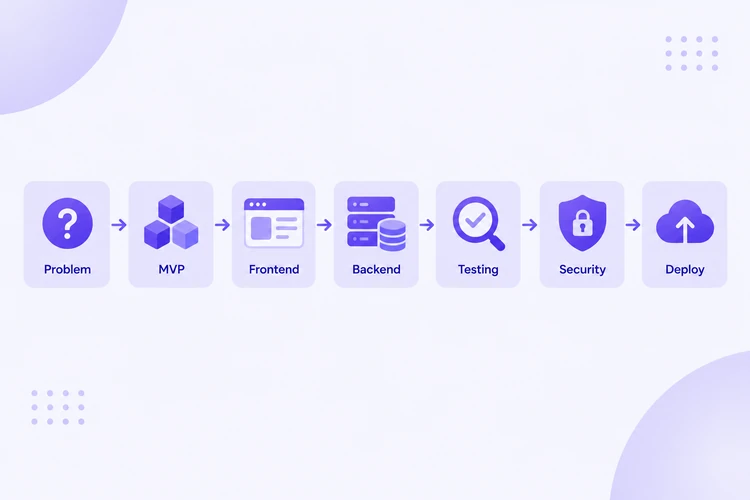
Start With the Problem, Not the Code
Before opening any AI tool, it's worth being specific about what problem you're actually solving and for whom. A clear problem statement, such as "freelancers need a simple way to track unpaid invoices," gives both you and the AI something concrete to work from.
Starting with the code instead of the problem tends to produce something that technically runs but doesn't solve anything useful. The clarity you bring to this step shapes every prompt and decision that follows.
Define the MVP
A minimum viable product (MVP) is the smallest version of your idea that still delivers real value and lets you test whether the concept works. Defining it means deciding what the core user flow actually is, and being deliberate about what to leave out for a later version.
A useful exercise is listing every feature you're tempted to include, then marking only the ones without which the product wouldn't function at all. Everything else becomes a "later" feature, not a "now" feature.
Use AI to Plan the Product
AI tools are useful earlier in the process than just code generation. Before writing anything, you can use an AI assistant to help outline user flows, sketch a basic data model, and identify edge cases you might not have considered on your own.
This planning step matters because vague prompts later in the process tend to produce vague, inconsistent code. A clear plan, even a rough one, gives you something specific to describe when you start generating actual implementation.
Build the Frontend With AI Assistance
With a plan in place, you can prompt an AI tool to generate the frontend: the interface users actually interact with. Effective prompts here describe not just what a screen should look like, but how it should behave, what happens on a successful action, what happens on an error, and what state the user sees while something is loading.
It helps to build incrementally rather than asking for an entire application at once. Generating one screen or component at a time makes it far easier to review, test, and correct each piece before moving to the next.
Build the Backend
The backend handles the logic, data storage, and rules your application depends on. When prompting for backend code, be explicit about expected inputs, expected outputs, and how the system should behave when something goes wrong, not just the successful path.
As with the frontend, building the backend in smaller pieces, one endpoint or function at a time, makes it easier to verify that each part actually does what you intended before layering more complexity on top of it.
Connect APIs
Most applications depend on external APIs for things like payments, authentication, maps, or third-party data. When connecting an API, read its actual documentation rather than relying solely on what the AI assumes it does, since AI tools can generate plausible-looking API calls that don't match the real service's current behavior.
Test each API connection on its own before wiring it into the rest of the application. This makes it much easier to tell whether a bug is coming from the API integration or from somewhere else in your code.
Review and Understand Generated Code
Before moving forward, take time to actually read through what's been generated. You're looking for logic that doesn't match what you intended, unnecessary complexity the AI may have introduced, and any part of the code you genuinely don't understand, since that's exactly where bugs tend to hide later.
If a section of generated code doesn't make sense to you, ask the AI to explain it, or rewrite it yourself in a way you do understand. Code you can't explain is code you can't reliably debug or extend.
Test the Application
Testing an AI-assisted app follows the same principles as testing any software, applied with slightly more care since you didn't necessarily write every line yourself. At minimum, test the core user flow from start to finish, try inputs the AI likely didn't anticipate, such as empty fields, unusual characters, or extremely large values, and verify that error states actually display correctly rather than silently failing.
Automated tests, even a small number covering the most critical flows, catch regressions far more reliably than manually clicking through the app after every change.
Fix Bugs and Iterate
When something breaks, resist the urge to just keep re-prompting the AI until the error disappears. Understanding why something failed, not just making the error message go away, is what prevents the same class of bug from reappearing somewhere else in the app.
A practical approach is to isolate the failing piece, reproduce the issue with a minimal example, and only then decide whether to fix it directly or ask the AI for a targeted correction, rather than regenerating large sections of working code unnecessarily.
Security and Environment Variables
Environment variables are configuration values, such as API keys or database credentials, kept outside your actual code so they aren't exposed in your source files or version control. Before deployment, check that no secrets or credentials are hardcoded directly into the generated code, input is validated on the backend, not just the frontend, and sensitive operations, such as payments or account changes, include proper authentication checks.
AI-generated code can follow insecure patterns without any obvious warning sign, so this review step shouldn't be skipped, even for a small MVP.
Prepare for Deployment
Before deploying, remove code that was generated during experimentation but never actually used, consolidate configuration so environment-specific values aren't scattered across the project, and confirm the app runs correctly from a clean environment, not just on the machine where it was originally built.
This step often reveals assumptions baked into the code that only worked because of something specific to your local setup, which is exactly the kind of issue you want to catch before real users encounter it.
Deploy the MVP
Deployment makes your application accessible outside your local machine, typically through a hosting platform for the frontend, a server or serverless platform for the backend, and a managed database if your app stores data. Many modern hosting platforms support deploying directly from a code repository, which simplifies this step considerably for a basic MVP.
Once deployed, test the live version directly, not just your local copy, since differences in configuration or environment variables between local and production can surface issues that weren't visible before.
What to Monitor After Launch
Launching isn't the end of the process. After deployment, it's worth keeping an eye on error rates and crash reports, actual usage patterns compared to what you expected, and performance under real traffic, which can behave differently than it did during local testing.
Early monitoring, even something simple, gives you the information needed to prioritize fixes based on what's actually affecting users, rather than guessing.
Common Mistakes When Vibe Coding
A few mistakes come up repeatedly when moving AI-assisted projects toward production. Skipping the planning step and prompting for code before the problem is well defined tends to produce inconsistent, hard-to-extend results. Trusting generated code without reading it leaves bugs and security issues undiscovered until users find them first.
Other common issues include testing only the happy path and ignoring realistic edge cases, hardcoding secrets directly into the codebase, and deploying without verifying the app actually works in a clean, production-like environment first.
Practical Production-Readiness Checklist
Before calling an AI-assisted app production-ready, it's worth confirming the following:
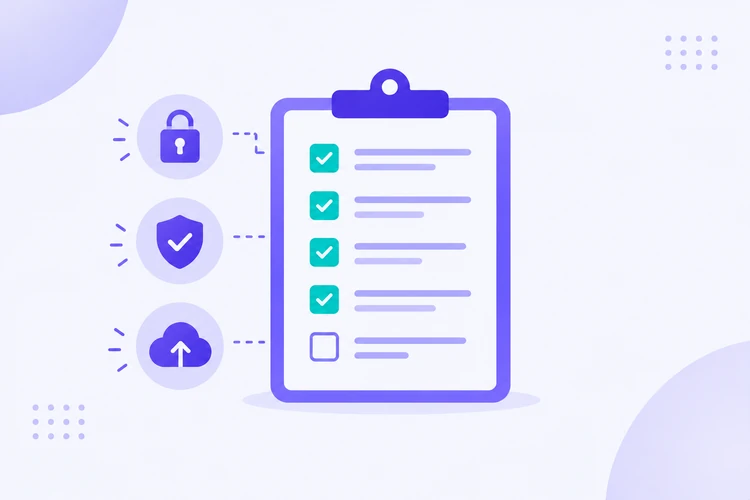
- The core user flow works reliably from start to finish.
- Secrets and credentials are protected, not hardcoded in the codebase.
- User inputs are validated, especially on the backend.
- Realistic failure cases have been tested, not just the expected path.
- The frontend handles API errors gracefully instead of failing silently.
- The backend behaves predictably under unexpected or malformed input.
- Unnecessary or unused generated code has been removed.
- The app is actually deployable from a clean environment.
- Production environment variables are configured correctly.
- The deployed app itself has been tested, not just the local version.
Conclusion
Moving an AI-assisted app from an idea to something real users can depend on involves far more than generating code that runs. Planning the product, building incrementally, reviewing what the AI produces, testing realistically, and securing the application before deployment are what actually determine whether the result holds up in production.
Moving from experimentation to a deployed, reliable application takes practice across product discovery, MVP planning, AI-assisted frontend and backend development, API integration, testing, and deployment. If you want hands-on practice with this full workflow, one structured way to build these skills is through Code Labs Academy's self-paced course, AI: Vibe Code To Production, which covers this process end to end.
Learn technical skills online with Code Labs Academy
Join our supportive community, unlock your potential, and embark on a rewarding career path.
Apply Now