
AWS Cloud Security: 7 Fundamentals Every Beginner Should Know
Updated on October 29, 202610 minutes read
AWS makes it easy to launch a server, a database, or a storage bucket in minutes. It also makes it easy to leave one of them open to the internet by mistake.
If you're new to AWS cloud security, the list of services and settings can feel endless. Most of it rests on seven core ideas. Learn these first, and the rest becomes much easier to understand.
Why AWS security needs to be designed, not added later
Security is much cheaper to plan than to fix. Picture a small team that builds an app with one admin account, shared passwords, and a database key pasted into the code. Six months later, they want to tighten things up.
Now every change risks breaking something that works. Nobody remembers which service uses which key. Removing broad permissions means testing the whole app again.
Teams that start with a secure-by-default mindset avoid this. They make the safe option the normal option from day one: limited access, no hard-coded secrets, encryption turned on, and logs recorded.
What does AWS cloud security actually mean?
AWS uses a shared responsibility model. AWS secures the cloud itself: the data centers, hardware, and core infrastructure. You secure what you put in the cloud: your accounts, data, settings, and code.
Many cloud security incidents come from customer-side mistakes rather than from AWS itself. Examples include a public storage bucket, an access key pushed to GitHub, or a user with far more permissions than they need.
That's why the fundamentals below focus on your side of the model. Each one closes a common gap.
1. Identity and access management
Identity and Access Management (IAM) controls who can do what in your AWS account. Every request to AWS, whether from a person or an application, is checked against IAM rules.
A few terms to know:
- Root user: the account created when you sign up. It has full, unrestricted access.
- IAM user: an identity for a person or app, often with long-term credentials.
- IAM role: an identity that trusted people or services can assume for a short time, using temporary credentials.
- Policy: a JSON document that lists allowed or denied actions.
Here is a small policy that allows reading files from one S3 bucket and nothing else:
{
  "Version": "2012-10-17",
  "Statement": [
    {
      "Effect": "Allow",
      "Action": ["s3:GetObject"],
      "Resource": "arn:aws:s3:::invoices-bucket/*"
    }
  ]
}
Good first habits: turn on multi-factor authentication (MFA) for the root user, then stop using it for daily work. Prefer roles with temporary credentials over long-lived access keys whenever possible. For people, AWS recommends central sign-in through IAM Identity Center.
2. Least privilege
Least privilege means giving each identity only the permissions it needs, and nothing more. It's one of the most effective ways to limit damage when something goes wrong.
Compare two ways to give an app access to storage:
| Approach | Policy idea | If the app is compromised |
|---|---|---|
| Too broad | Allow s3:* on all buckets | The attacker can read, change, or delete every bucket |
| Least privilege | Allow s3:GetObject on one bucket | The attacker can only read files in that one bucket |
Least privilege is an ongoing process. Start narrow, add permissions when something legitimately fails, and review access regularly. Tools such as IAM Access Analyzer can help you spot unused or overly broad permissions.
3. Secrets management
A secret is any sensitive value an app needs to run: database passwords, API keys, or tokens. The classic beginner mistake is placing secrets directly in code or config files.
Once a secret lands in a Git repository, it can stay in the history even after you delete the line. If the repository is public, automated scanners may find it quickly.
Instead, store secrets in a dedicated service:
- AWS Secrets Manager stores secrets, controls who can read them, and can rotate some of them automatically.
- AWS Systems Manager Parameter Store can hold configuration values, including encrypted ones.
Your app then fetches the secret at runtime, using an IAM role that's allowed to read only that secret. If a secret is ever exposed, rotate it right away. Deleting it from the code is not enough.
4. Encryption and key management
Encryption scrambles data so only someone with the right key can read it. You'll hear about two kinds:
- Encryption at rest protects stored data, such as files in S3 or rows in a database.
- Encryption in transit protects data moving across a network, usually with TLS (the "S" in HTTPS).
AWS Key Management Service (KMS) creates and manages encryption keys. Many AWS services integrate with it, so turning on encryption is often a single setting.
The harder part is managing who can use the keys. A KMS key has its own policy, so even a user with access to an S3 bucket can't decrypt the files without permission to use the key. This gives you a second layer of control.
AWS has made several encryption settings the default over time. For example, new objects in S3 are encrypted by default. Defaults change, so check the current documentation for each service you use.
5. Network and security boundaries
A security boundary is a line that limits who or what can reach a resource. In AWS, the main network boundary is the Virtual Private Cloud (VPC), your own private network inside AWS.
Inside a VPC, you control traffic with a few tools:
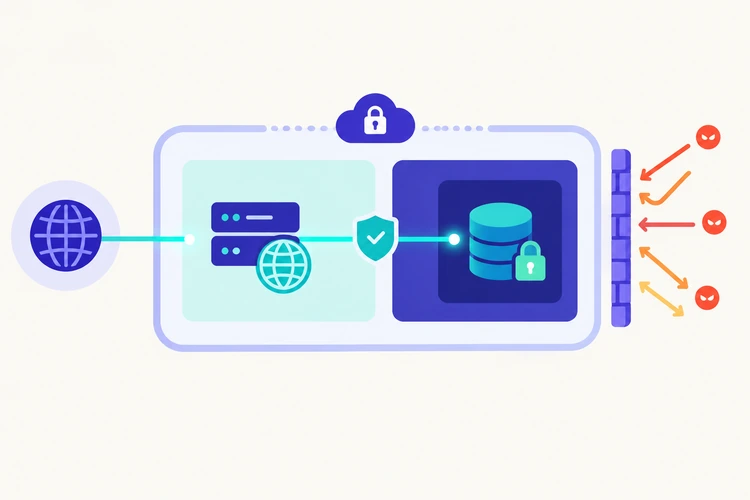
- Public and private subnets: put web servers in public subnets and keep databases in private subnets with no direct internet access.
- Security groups: virtual firewalls on resources. For example, allow database traffic only from your app servers.
- Network ACLs: optional subnet-level rules for an extra layer of filtering.
A simple rule of thumb: nothing should be reachable from the internet unless it truly needs to be. An open SSH port (22) or database port to the whole internet (0.0.0.0/0) is a red flag.
Boundaries aren't only about networks. Separate AWS accounts for development and production are also a strong boundary. That way, a mistake in development can't touch production data.
6. Logging and auditing
Logging records what happens in your account. Auditing means reviewing those records to check that everything is as expected.
The core AWS services for this are:
| Service | What it records or checks | Example question it answers |
|---|---|---|
| AWS CloudTrail | API calls: who did what, when, and from where | Who deleted this S3 bucket on Tuesday? |
| Amazon CloudWatch | Logs, metrics, and alarms | Did failed logins spike last night? |
| AWS Config | Resource settings and changes over time | Which security groups allow SSH from anywhere? |
CloudTrail keeps a recent event history by default, but for long-term records you set up a trail that saves logs to an S3 bucket. Protect that bucket carefully, because attackers often try to delete logs to hide their tracks.
Logs are only useful if someone looks at them. Start with a few alerts, such as root user sign-ins or changes to IAM policies.
7. Security in the development pipeline
A CI/CD pipeline automatically tests and deploys your code. It's a powerful tool, which also makes it a target. A pipeline often has permission to change your production environment.
Building security into this pipeline is often called DevSecOps. A few practical steps:
- Scan for secrets before code is merged. Open-source tools such as Gitleaks look for keys and passwords in commits.
- Scan for vulnerabilities in dependencies, container images, and infrastructure code. Trivy is one widely used open-source scanner.
- Avoid long-lived AWS keys in the pipeline. Many CI services can use OpenID Connect (OIDC) to assume an IAM role with short-lived credentials.
- Apply least privilege to the pipeline role too. A deploy job for one app shouldn't be able to change IAM or delete other resources.
The goal is to catch problems before they reach AWS, when they're cheapest to fix.
Common beginner mistakes
Most early AWS security problems come from a short list of habits. Check your own account against it.
| Mistake | Safer alternative |
|---|---|
| Using the root user for daily tasks | Lock root with MFA; use IAM Identity Center or roles |
| Attaching admin access to every user or app | Grant only the actions and resources each one needs |
| Hard-coding keys in code or config files | Use Secrets Manager or Parameter Store |
| Making S3 buckets public to "make it work" | Keep Block Public Access on; share files through presigned URLs or a CDN |
Opening ports to 0.0.0.0/0 | Restrict security groups to known sources |
| No CloudTrail trail or alerts | Create a trail and alert on high-risk events |
| Long-lived access keys in CI/CD | Use OIDC and short-lived role credentials |
How the fundamentals work together
These seven ideas are strongest when combined. Think of them as layers: if one fails, another still protects you.
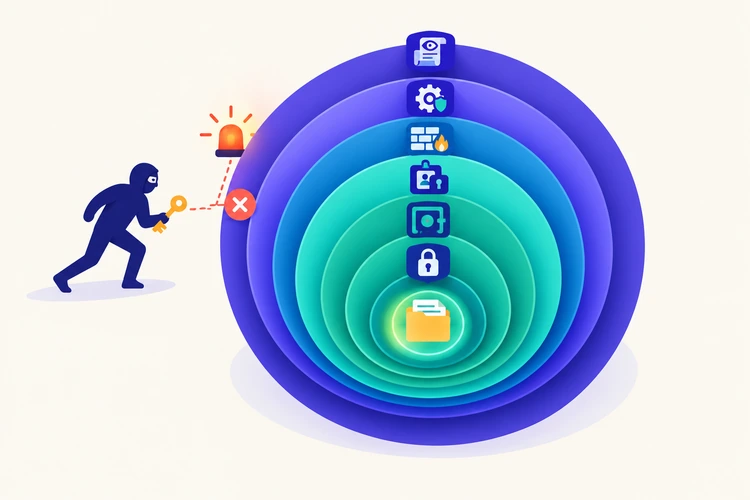
Take a simple web app that stores customer invoices:
- The app runs with an IAM role that can only read and write one S3 bucket (least privilege).
- Its database password lives in Secrets Manager, not in the code.
- Invoices are encrypted with a KMS key that only the app role can use.
- The database sits in a private subnet, reachable only from the app's security group.
- CloudTrail records every API call, and an alarm fires if someone changes the bucket policy.
- The CI/CD pipeline scans each commit for secrets and vulnerabilities before deploying.
Now imagine an attacker steals the app's credentials. They can't reach other buckets, can't change IAM, and their activity shows up in the logs. That's defense in depth: no single control has to be perfect.
Beginner learning roadmap
You don't need to learn everything at once. A practical order:
- Secure your account. Enable MFA on root, create admin access through IAM Identity Center, and set a billing alert.
- Learn IAM policies. Write a few by hand. Read what each action and resource means.
- Practice least privilege. Build a small app and give it the narrowest role that still works.
- Move secrets out of code. Store one secret in Secrets Manager and fetch it at runtime.
- Turn on encryption and explore KMS. Create a key and test who can and can't use it.
- Build a basic VPC. Place an app in a public subnet and a database in a private one.
- Set up logging. Create a CloudTrail trail and one CloudWatch alarm.
- Secure a pipeline. Add a secrets scan and a vulnerability scan to a CI workflow.
Use a separate practice account and keep an eye on costs while you learn. Most of these steps can be done with very little spending, but some services do charge.
A guided, hands-on option
For readers who want hands-on practice rather than only reading about these concepts, one structured option is Code Labs Academy's AWS Cloud Security Fundamentals self-paced course. According to the course page, it's aimed at beginners.
Its modules cover IAM design and least privilege, secrets and key management, security scanning in CI/CD with Gitleaks and Trivy, and logging and auditing. It ends with a capstone in which learners build a secure cloud environment. AWS's own documentation and free training are also useful resources alongside any course.
Conclusion and next steps
AWS cloud security starts with a handful of ideas: control identities, grant the least privilege, keep secrets out of code, encrypt data, draw clear boundaries, log everything important, and secure the pipeline that deploys your work.
None of these require advanced skills. They require habits, applied from the first day of a project rather than after something goes wrong.
Pick one fundamental this week and apply it to an account you control. Enabling MFA on root and creating your first CloudTrail trail takes less than an hour. Each small step makes the next one easier.

Learn technical skills online with Code Labs Academy
Join our supportive community, unlock your potential, and embark on a rewarding career path.
Apply Now